
EvoMedia
Image Optimization for WordPress – On Your Server, Unlimited
Convert your media to WebP, JPEG, AVIF and JPEG XL locally. No cloud, no per-image credits, no monthly quota. Optimize a hundred images or a hundred thousand for the same flat license. Then see where every image is actually used, take control of the resized copies WordPress generates behind your back, reclaim the disk that duplicates, orphaned files and unused images quietly waste – and write the alt text nobody ever gets round to, by hand from the list or with your own AI key.
Solo
Single Site
39€ /year
Perfect for a single site owner who wants unlimited optimization.
✓ 1 Active Domain License
✓ Unlimited images – no quota
✓ Alt text for a whole library
✓ Bulk Rename – no re-upload
✓ Full library cleanup + resize + Backups
✓ 1 Year Updates & Support
Studio
Multi-Site
99€ /year
Best value for freelancers running several sites.
✓ 5 Active Domain Licenses
✓ Unlimited images – no quota
✓ Alt text for a whole library
✓ Bulk Rename – no re-upload
✓ Full library cleanup + resize + Backups
✓ Priority Updates & Support
Agency
Agency Pack
199€ /year
Built for agencies and studios managing client networks.
✓ 15 Active Domain Licenses
✓ Unlimited images – no quota
✓ Alt text for a whole library
✓ Bulk Rename – no re-upload
✓ Full library cleanup + resize + Backups
✓ 1 Year VIP Support
Why EvoMedia Outperforms Cloud Image Optimizers
Where It Runs
Other plugins: cloud API
EvoMedia: on your server ✓
Image Limits
Other plugins: monthly credits/quota
EvoMedia: unlimited ✓
Privacy
Other plugins: images sent to cloud
EvoMedia: never leave your host ✓
Formats
Other plugins: WebP (AVIF on some)
EvoMedia: WebP, JPEG, AVIF, JXL ✓
Feature-by-Feature Comparison
See how EvoMedia stacks up against the popular image optimizers
| Feature | EvoMedia Pro | Imagify | ShortPixel | Smush | EWWW |
|---|---|---|---|---|---|
| Model & cost | |||||
| Where images are processed | On your server (local) | Cloud API | Cloud API | Cloud / CDN | Local or cloud |
| Per-image credits or monthly quota | None (unlimited) | Quota | Credits | Plan-based | None (local) |
| Images stay on your host (privacy) | ✓ | ✗ | ✗ | ◐ | ◐ |
| Works fully offline (no external service) | ✓ | ✗ | ✗ | ◐ | ✓ |
| No third-party account required | ✓ | ✗ | ✗ | ◐ | ✓ |
| Pricing model | One yearly license, unlimited | Subscription by quota | Credits / subscription | Subscription | Free + paid API |
| Output formats | |||||
| WebP output | ✓ | ✓ | ✓ | ✓ | ✓ |
| AVIF output | ✓ | ✓ | ✓ | ◐ | ✓ |
| JPEG XL output | ✓ | ✗ | ✗ | ✗ | ✗ |
| Convert automatically on upload | ✓ | ✓ | ✓ | ✓ | ✓ |
| Bulk-convert existing library | ✓ | ✓ | ✓ | ✓ | ✓ |
| Media management | |||||
| Replace image in place, keep ID & URL | ✓ | ✗ | ✗ | ✗ | ✗ |
| Cross-format replace (JPEG → WebP) | ✓ | ✗ | ✗ | ✗ | ✗ |
| Rename file + all thumbnails | ✓ | ✗ | ✗ | ✗ | ✗ |
| Rewrite references (posts + serialized meta) | ✓ | ✗ | ✗ | ✗ | ✗ |
| Choose which sub-sizes WordPress generates | ✓ | ✗ | ✗ | ✗ | ◐ |
| Delete one image size library-wide | ✓ | ✗ | ✗ | ✗ | ✗ |
| Reclaim disk from oversized originals | ✓ | ◐ | ◐ | ◐ | ◐ |
| Backup & restore originals | ✓ | ✓ | ✓ | ◐ | ✓ |
| Backups manager (browse / export ZIP) | ✓ | ◐ | ◐ | ✗ | ◐ |
| Alt text & accessibility | |||||
| See which images have no alt text | ✓ | ✗ | ◐ | ✗ | ✗ |
| Read and fix alt text from the media list | ✓ | ✗ | ◐ | ✗ | ✗ |
| Generate alt text with AI | ✓ | ✗ | ✓ | ✗ | ✗ |
| Alt text for a whole library at once | ✓ | ✗ | ✓ | ✗ | ✗ |
| Written from the page the image appears on | ✓ | ✗ | ◐ | ✗ | ✗ |
| Bring your own AI key, billed direct | ✓ | ✗ | ✗ | ✗ | ✗ |
| Library cleanup & insight | |||||
| See where every image is used | ✓ | ✗ | ✗ | ✗ | ✗ |
| Detect and delete unused images | ✓ | ✗ | ✗ | ✗ | ✗ |
| Find and merge duplicate images | ✓ | ✗ | ✗ | ✗ | ✗ |
| Find and remove orphaned files | ✓ | ✗ | ✗ | ✗ | ✗ |
| Broken-reference report | ✓ | ✗ | ✗ | ✗ | ✗ |
| Resize existing images, links intact | ✓ | ✗ | ✗ | ✗ | ✗ |
| Server & control | |||||
| Runs locally on Imagick or GD | ✓ | ✗ | ✗ | ◐ | ✓ |
| Server capability report (System Info) | ✓ | ✗ | ✗ | ✗ | ◐ |
🎯 Which One Should You Choose?
✅ Choose EvoMedia If:
• You want unlimited optimization with no per-image credits
• You care about privacy – images should never leave your server
• You need to replace or rename images without breaking links
• You want AVIF and JPEG XL, not just WebP
• You want to choose which image sizes WordPress generates
• You want to reclaim disk space from oversized originals and unused sizes
• You want to see where every image is used and clear out duplicates, orphans and pictures nothing needs
• You want the alt text finally written – by hand from the list, or by a model using your own AI key
• You prefer one flat yearly license over a metered subscription
❌ What Cloud Optimizers Struggle With:
• Monthly quotas – optimization stops when credits run out
• Your images uploaded to a third-party service
• Extra cost as your library grows
• No in-place replace – swapping a file breaks references
• No safe rename across posts and serialized meta
• No control over the sub-sizes WordPress keeps creating
• No library cleanup – no idea which images are unused, no safe way to clear duplicates or orphans
• Nothing for alt text – the one field every image needs and nobody fills
• Recurring bills that scale with usage
🎯 The Real Difference:
While cloud optimizers meter your images and send them off your server, EvoMedia does the work locally through your own Imagick or GD – unlimited images, complete privacy, one flat license. And it’s not just a compressor: EvoMedia replaces and renames images in place, rewriting every reference across posts and postmeta (serialized data included), decides which resized copies WordPress is allowed to create, and reclaims real disk space from oversized originals and the sizes your theme never uses. It even shows you where every image is actually used and safely clears the duplicates, orphaned files and unused pictures that quietly fill your disk. Because it knows where each picture appears, it can also write the alt text from the page it appears on – with your own AI key, on your own account, with no service of ours in between. You get next-gen AVIF and JPEG XL output with full control over what your server produces.
A Complete Media Workflow, Not Just a Compressor
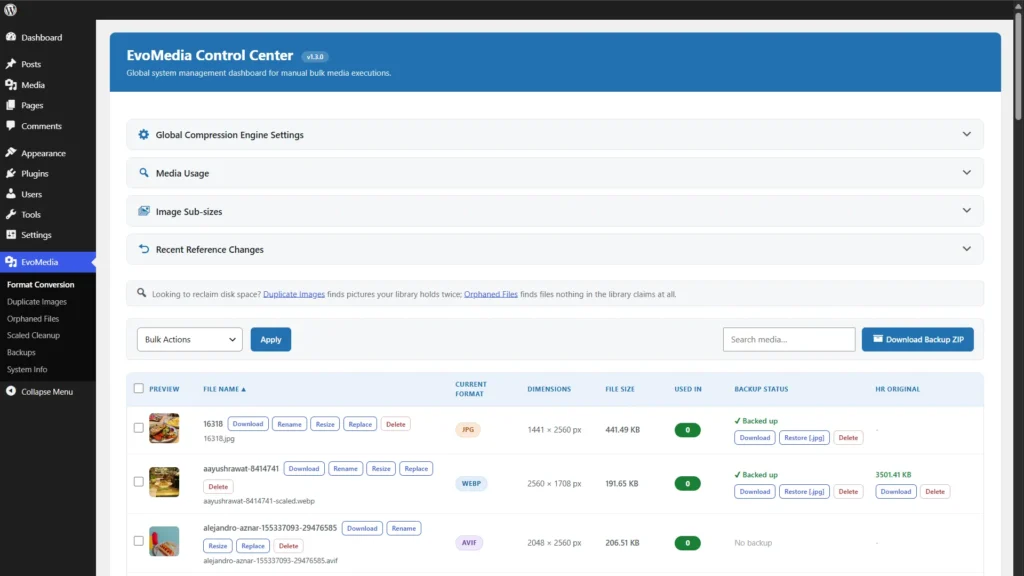
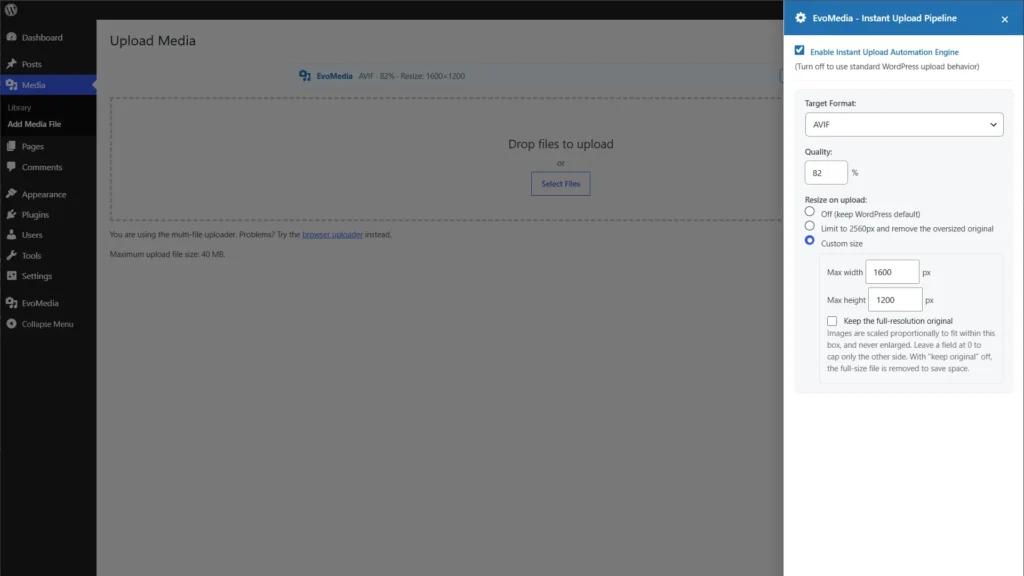
🖼️ Automatic Conversion on Upload
Every image becomes an optimized next-gen format the moment it’s uploaded – or convert your whole library in bulk.
- Every format your server can encode
- Convert on upload or in bulk
- Keeps your originals safe
🎯 AVIF & JPEG XL (Free)
Squeeze files further with the newest formats. EvoMedia offers every format your image driver can actually encode – nothing is locked or held back.
- AVIF output for modern browsers
- JPEG XL via Imagick + libjxl
- System Info shows what’s available
🔄 Replace Media in Place
Swap a JPEG for a WebP behind the same attachment, keeping its ID – free, in every plan.
- Keep the file name, or adopt the new one
- Cross-format replace (JPEG → WebP)
- Rewrites every reference, serialized data included
✏️ Alt Text You Can Fix (Free)
The one field on an image that is always in use, and the one nobody fills. Read it and correct it straight from the list.
- Under each file name, not behind a modal
- A view of only the images that have none
- The count beside it, so you know the size of the job
✨ Alt Text with AI (Free)
Bring your own key from OpenAI, Google or Anthropic and a model writes the first draft. Nothing is stored until you accept it.
- Your key, your account, no markup from us
- You choose the language the answer comes back in
- No key means no network requests at all
📚 A Whole Library at Once (Pro)
The part only a plugin that knows where your images are used can do: write the alt text from the page each one appears on.
- A whole selection in one run, never overwriting by accident
- From the page, not from the picture alone
- On WPML or Polylang, each language in its own language
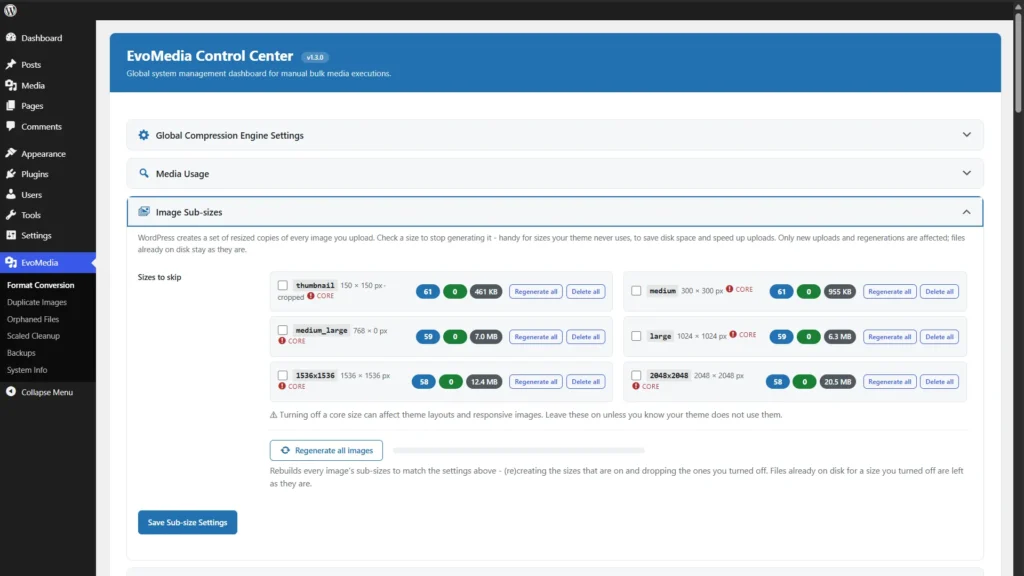
📐 Image Sub-sizes (Free)
WordPress quietly makes a stack of resized copies of every upload. Decide which ones it is allowed to create.
- Live count of how many images have each size
- Switch off the sizes your theme never uses
- Regenerate the whole library in one click
🧯 Per-size Cleanup (Pro)
Switching a size off stops new copies. This is what gives the gigabytes already on disk back.
- Delete one image size across the whole library
- Or regenerate just that one size
- Runs in batches with live progress
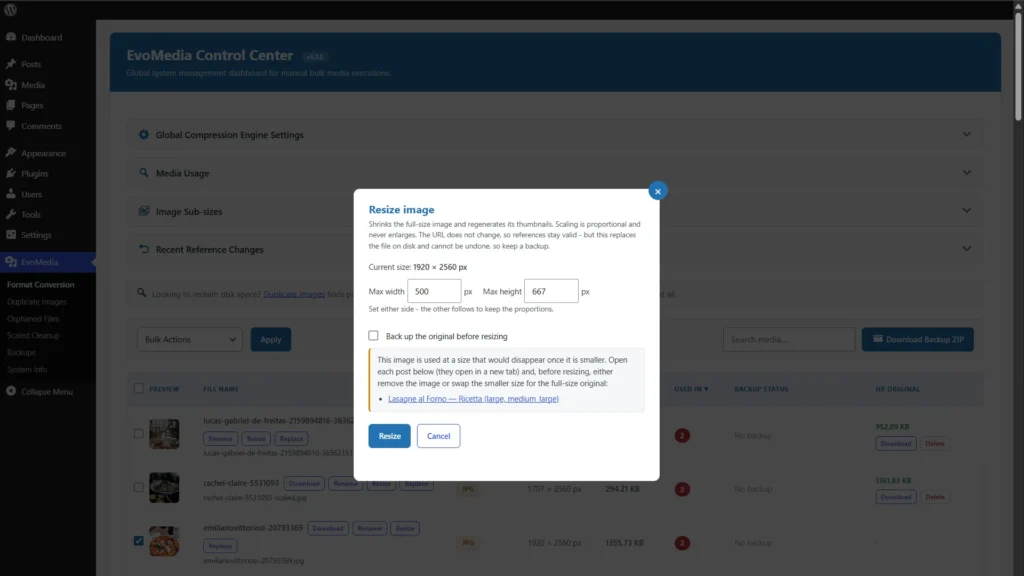
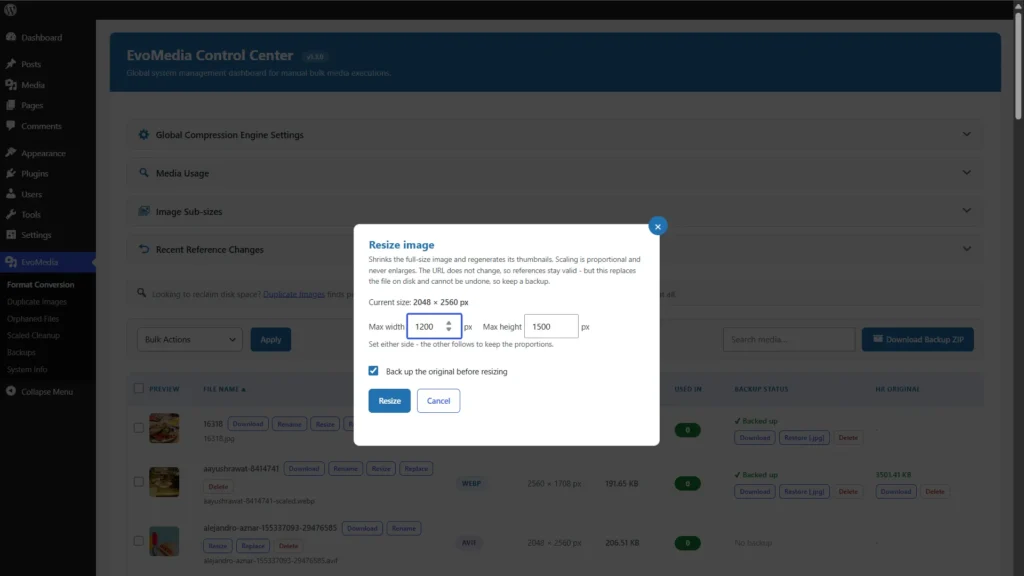
📐 Custom Resize (Pro)
The free core caps uploads at 2560px; Pro lets you set your own limit – and shrink images already in your library.
- Your own maximum width and height on upload
- Resize any single image from the Control Center
- Proportional and link-safe – refuses rather than break a page
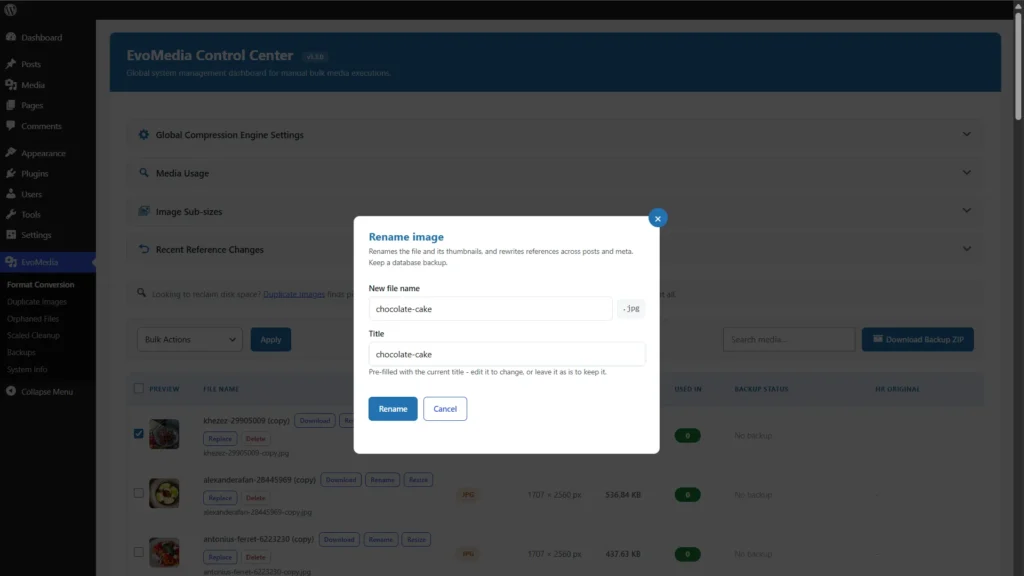
✏️ Bulk Rename, No Re-upload (Pro)
Rename straight from the Media Library – no need to have the file on your computer.
- Rename without re-uploading anything
- Renames the served file + every thumbnail
- Runs in bulk across the whole library
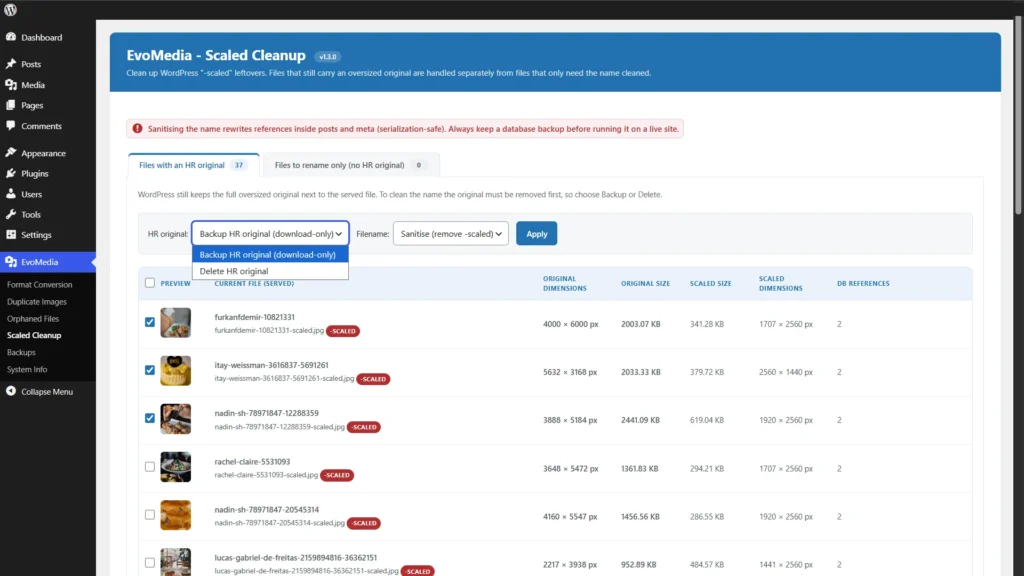
🧹 Scaled Cleanup (Pro)
Remove the oversized full-resolution originals WordPress keeps and reclaim disk.
- Finds -scaled originals
- Cleans up media already in your library
- Often the biggest disk saving
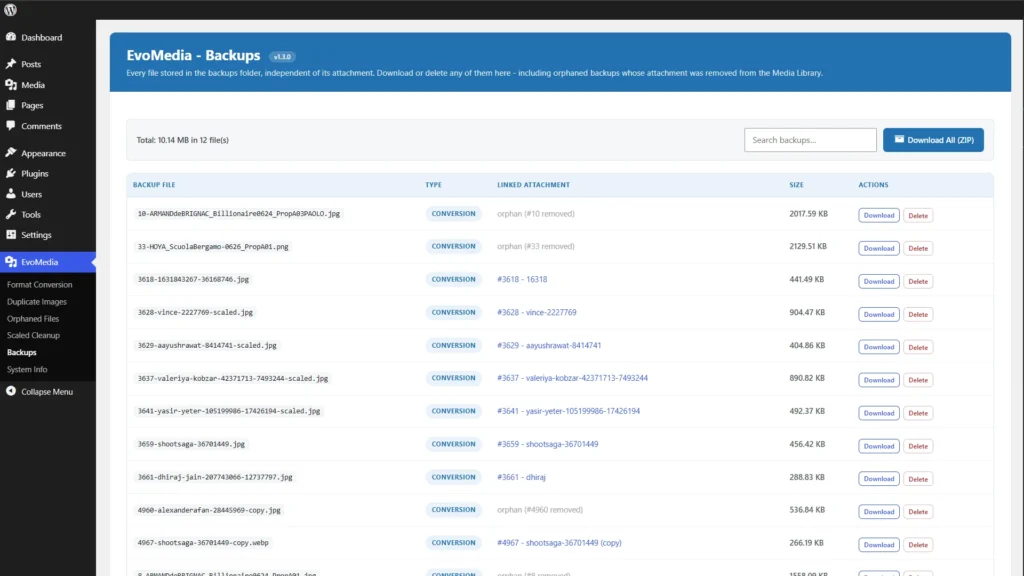
🗄️ Backups Manager (Pro)
One screen for every original EvoMedia has archived – including the orphans.
- Browse every stored backup in one place
- Find and clean orphaned backups
- Export them all as a ZIP
💾 Backup & Restore
The original is archived before every conversion and can be restored any time.
- Automatic backup before converting
- Restore per image or in bulk
- Included in the free core
🩺 System Info
A one-page report of exactly which formats your server can produce.
- Imagick / GD capability check
- WebP, AVIF, JPEG XL support
- Know before you buy
🔌 Offload-Aware
Plays nicely with existing media setups and detects moved files.
- Works alongside common media plugins
- Detects off-site files
- No broken conversions
See Into Your Library – and Reclaim What It Wastes
The free core shows you where every image is used and what is quietly wasting your disk. Pro is what clears it out – safely, without ever breaking a page.
🔎 See Where Images Are Used (Free)
Build an index and every image shows a “Used in” count – the exact posts, fields and site settings that reference it, and which size each one uses.
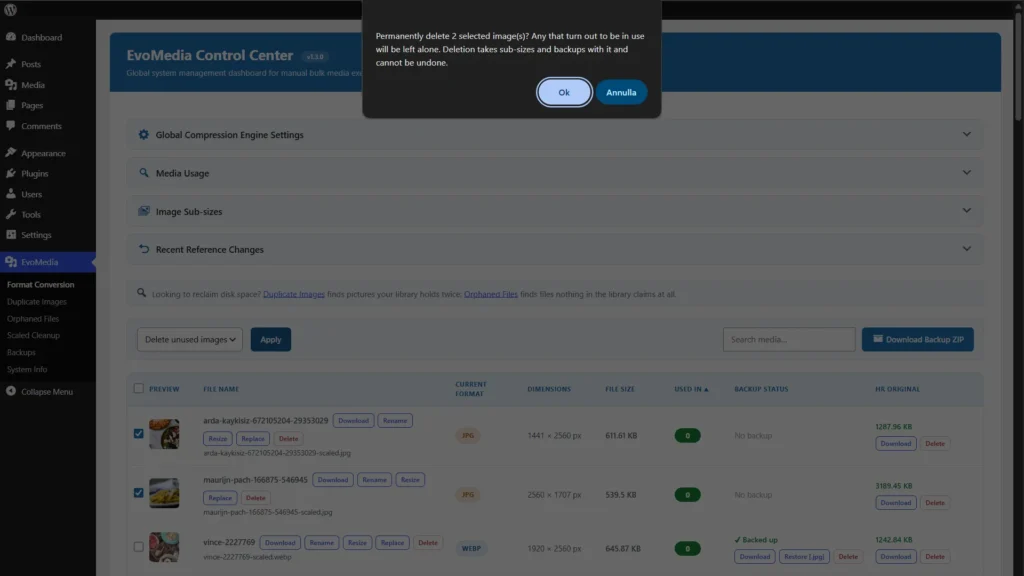
🗑️ Delete Unused Images (Pro)
Remove the pictures nothing on your site points at, one by one or in bulk – re-checked against live content at the moment of deletion, so nothing in use is ever lost.
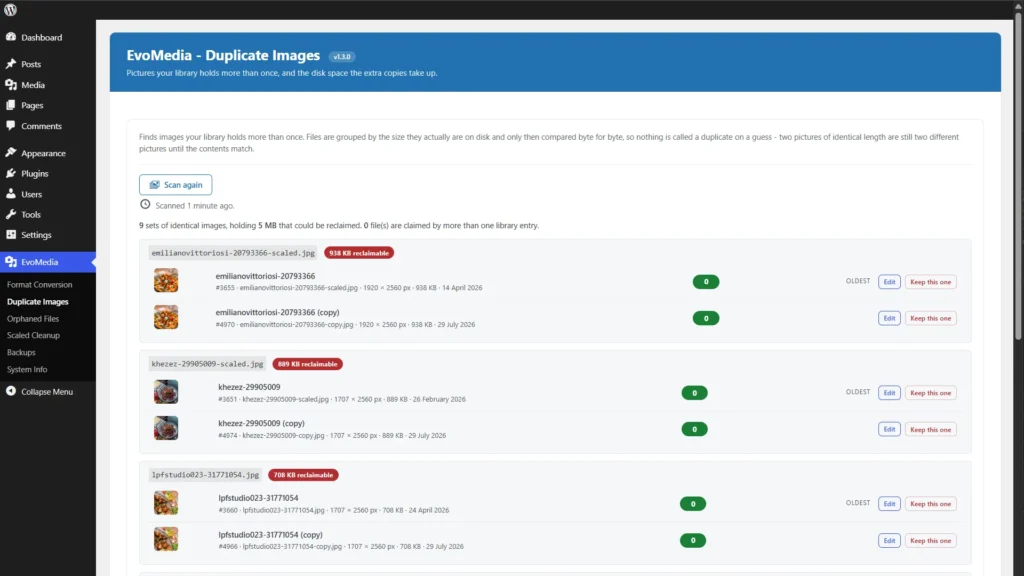
🧿 Find & Merge Duplicates (Pro)
The same photo uploaded three times is three times the disk. Merge a set onto the copy you keep – every reference moved first, then the extras removed. Reversible.
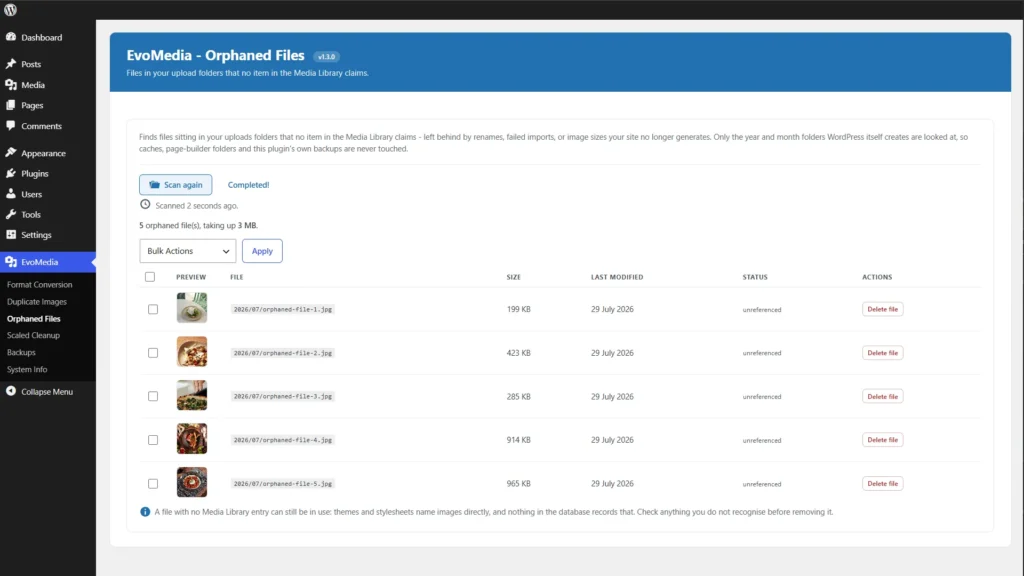
📁 Remove Orphaned Files (Pro)
The leftovers of old renames and imports that no library item claims – deleted only after a fresh re-scan, and never while your content still asks for them.
By the Numbers
∞
Unlimited Images
No per-image credits, no monthly quota. The only limit is your disk.
4
Output Formats
WebP, JPEG, AVIF and JPEG XL – more than most competitors offer.
0
Cloud Calls
Conversion runs locally and your images never leave your hosting – unless you switch on the AI alt text yourself, with your own key.
1
Flat License
One yearly license covers unlimited image processing on your domains.
How It Works – Simple 4-Step Process
Install the Free Core
Add EvoMedia from WordPress.org. Conversion works right away – WebP, AVIF, JPEG XL, whatever your server can encode.
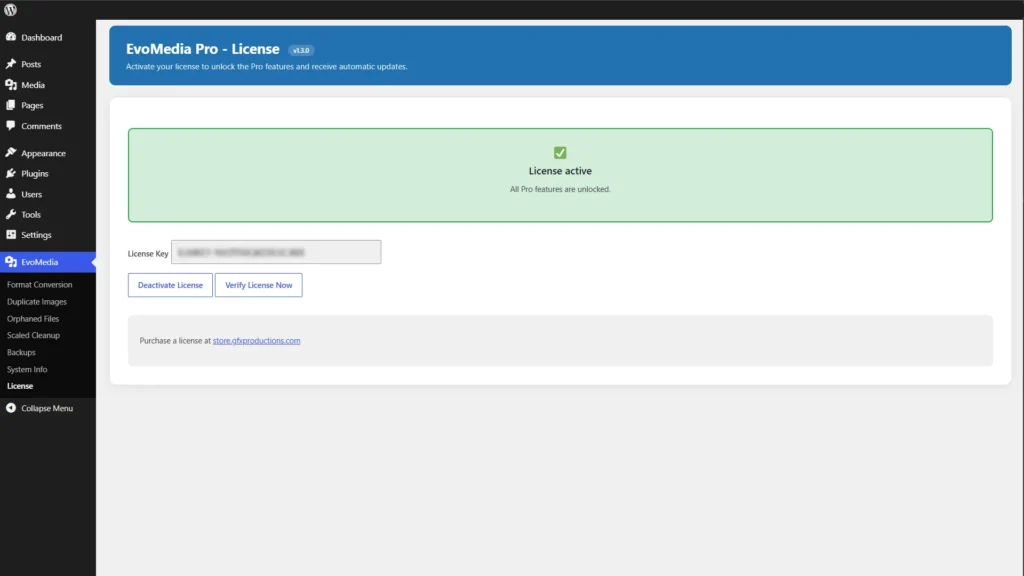
Activate Your Pro License
Paste your key on EvoMedia → License to unlock the full cleanup suite – delete unused images, merge duplicates, clear orphaned files and oversized originals – plus alt text for a whole library, custom resize, bulk Rename and the Backups manager.
Pick Format & Sizes
Choose the output format, the upload rules, and which sub-sizes WordPress may create. System Info shows what your server supports.
Convert & Reclaim Space
New uploads convert automatically; bulk-convert the library, then reclaim space – clear oversized originals, the sizes you switched off, duplicates and the images nothing uses.
FAQ
General Questions
Q: Are there any limits on how many images I can optimize?
A: No. EvoMedia has no per-image credits, no monthly quota and no counter. Everything runs on your own server, so the only limit is your disk space.
Q: Do my images get uploaded to a cloud service?
A: Conversion, resizing and every other operation run locally through your server’s Imagick or GD, and send nothing anywhere. The one exception is optional and switched on by you: if you enter your own AI key to have alt text written, that image and a short instruction go to the provider you chose, on your account. With no key the plugin makes no network requests at all.
Q: Do I need coding knowledge?
A: No. Basic WordPress knowledge is enough – install, pick a format, and you’re converting.
Q: When does conversion happen – will it slow my site?
A: Conversion runs when you upload (or during a bulk run), not when visitors load a page. Front-end speed is unaffected – visitors simply receive smaller images.
Q: Which image types can it convert?
A: JPEG, PNG and GIF sources are converted to your chosen output format. Originals are always backed up first.
Formats & Server
Q: What do I need for AVIF and JPEG XL?
A: Only a server that can encode them – both are in the free plugin. AVIF works through Imagick or GD (PHP 8.1+), so most hosts have it. JPEG XL is rarer: it needs Imagick compiled with libjxl. The built-in System Info page tells you exactly what your server can produce.
Q: Imagick or GD – which do I need?
A: Either works. Imagick is recommended and unlocks the most formats. System Info reports what’s installed.
Q: Will it work on shared hosting?
A: Yes, as long as PHP has Imagick or GD. Heavy bulk conversions are faster on a VPS.
Q: Why don’t I see AVIF or JPEG XL in the format list?
A: Because your server can’t encode it. EvoMedia only lists formats your image driver can actually write – nothing is greyed out, hidden or locked. JPEG XL needs Imagick built with libjxl, which few hosts provide; AVIF is far more common. System Info tells you exactly what yours supports.
Q: Does converting reduce image quality?
A: You control the quality level, and every original is backed up before conversion – so you can re-convert or restore at any time.
License & Updates
Q: How long does my license last?
A: The plugin works forever. Updates & support are included for 1 year from purchase.
Q: What happens after the license expires?
A: Already-converted images keep working and the plugin keeps running. Renew to continue receiving updates and new Pro features.
Q: How do I update the plugin?
A: Updates appear in your WordPress dashboard. Click “Update” when available.
Q: Can I move a license to another domain?
A: Yes. Deactivate it on the old site (or from your account) and activate it on the new one, within your plan’s domain count.
Media Management
Q: Will replacing or renaming an image break my links?
A: No. EvoMedia rewrites every reference to the file across your posts and postmeta, including serialized data, so galleries, page builders and meta fields keep working.
Q: Do I need an AI account to fix alt text?
A: No. Reading and correcting alt text, and the view that lists every image without any, need no key and no account – that is most of the work, and it is all in the free plugin. A key is only needed if you want a model to write the first draft.
Q: What does the AI alt text cost, and who pays for it?
A: You do, directly to OpenAI, Google or Anthropic, on the key you entered. There is no markup, no credits to buy from us and no plan of ours in the middle – the request goes from your server to them. One image is one request, so nothing runs away with your money by accident.
Q: What can Pro do with alt text that the free plugin cannot?
A: Three things. It writes a whole selection in one run instead of one image at a time; it writes from the page each image actually appears on rather than from the picture alone, which is only possible because it knows where your images are used; and on WPML or Polylang it writes each language in its own language instead of copying one across.
Q: Can I stop WordPress creating image sizes I never use?
A: Yes, and it’s in the free plugin. EvoMedia lists every registered sub-size with a live count of how many images have it, and lets you switch off the ones your theme doesn’t need – only new uploads and regenerations are affected, files already on disk stay untouched. Pro then adds the cleanup that deletes those existing copies and hands the disk space back.
Q: Can I convert a library that already has thousands of images?
A: Yes. Bulk conversion processes your existing media, and Scaled Cleanup removes the oversized full-size originals WordPress stores.
Q: Can I restore an original after converting?
A: Yes. The original is archived before every conversion and can be restored per image or in bulk.
Q: What is Scaled Cleanup?
A: For large uploads WordPress keeps a full-resolution “-scaled” original. Scaled Cleanup finds and removes those across your library, reclaiming real disk space.
Q: Can EvoMedia tell me which images are actually unused?
A: Yes. Build the Media Usage index (free) and every image shows where it is used across your posts, custom fields and site settings. Pro then deletes the ones nothing points at, re-checking your live content at the moment of deletion so nothing in use is ever removed.
Q: Does it find duplicate and orphaned files?
A: Yes. The free build lists byte-identical duplicates, and files in your upload folders that no library item claims. Pro merges the duplicates – moving every reference onto the copy you keep first – and deletes the orphans after a fresh re-scan, never while your content still asks for them.
Q: Can I resize images that are already in my library?
A: Yes, with Pro – straight from the Control Center, proportionally and link-safe. It refuses with a guided message rather than break a page that still uses the old size. The free build can also cap new uploads at 2560px.
Q: The Replace buttons are missing – why?
A: If a media offloader (e.g. WP Offload Media) has moved a file off-site, EvoMedia detects it and hides actions that would otherwise break the link.
Pricing
Q: What’s the difference between the free plugin and Pro?
A: The free core converts to every format your server can encode – WebP, JPEG, AVIF, and JPEG XL where the host provides it – backs up originals, does the complete Replace (same format or cross-format, keeping the file name or adopting the new one, rewriting every reference for you), lets you choose which sub-sizes WordPress generates, caps oversized uploads at 2560px, shows you where every image is used – plus reports of duplicate and orphaned files – and lets you read, fix and generate alt text one image at a time with your own AI key. Pro is what safely acts on all of that: delete unused images, merge duplicates and remove orphaned files, clear the oversized -scaled originals and the sub-sizes you switched off, alt text for a whole library (written from the page each image appears on, and one per language on WPML or Polylang), custom resize (your own maximum size on upload, plus resizing images already in your library), bulk Rename, JPEG XL uploads and the Backups manager. The free plugin is complete on its own, has nothing locked, and never limits how many images you process.
Q: How many sites does a license cover?
A: Each license activates on the number of domains in your plan (1, 5 or 15). Every covered site gets unlimited image processing.
Q: Is there a free version?
A: Yes – the free EvoMedia on WordPress.org. The Pro add-on installs right alongside it.
Q: What if EvoMedia doesn’t work on my server?
A: Check the System Info page first – it confirms which formats your server can produce before you buy. If something’s wrong after purchase, contact us within the support window.
Support
Q: How do I get support?
A: https://store.gfxproductions.com/contact/
Q: What’s the response time?
A: Within 24 hours on business days.
Q: Can you help with custom development?
A: Yes. Contact us for a custom development quote.
Q: Where can I see what my server supports?
A: The built-in System Info page reports your Imagick/GD capabilities and every format it can produce – share it with support to speed up any troubleshooting.